
Interactive Fountain
Interactive Fountain is an interactive effects widget: when viewers like or send gifts, particles and gift icons burst upward from the bottom of the live frame, tossed up and falling back like a fountain. Good for zero-barrier warm-ups, like rushes, small-gift atmosphere boosts, and any other live segment where you want every interaction to be seen.
Trigger Rules#
| Interaction | Rule |
|---|---|
Likes |
Spawns a number of shape particles matching the like count (capped at 100 per single message) |
Gifts |
Any gift triggers the effect: gift icons spawn based on the gift count; gifts sent in a combo only spawn on the cumulative increase, with no double counting |
| Combo effect (advanced) | For small gifts priced above 0 and below 99 diamonds, sending 100 or more at once (or reaching a cumulative 100 for the first time within the same combo round) triggers one combo effect: the central big gift is tossed straight up with a large scatter of small gifts, and the gifting viewer's avatar is shown. The same combo round only triggers it once |
Understanding the combo effect
In short, small gifts pooled to 100 unleash the big move. Viewers can also fill the quota across a combo — once the cumulative count reaches 100, it triggers once, giving small-gift fans a big moment.
Overall Layout#
By interface function, you can understand Interactive Fountain as the following two areas:
Live preview: a 16:9 canvas on the left that renders the fountain effect in real time, plus a row of test buttonsEffect settings: the configuration area on the right, for setting interaction types, particle styles, color schemes, and fountain parameters
Any configuration change is saved automatically and synced to loaded widgets in real time — no manual saving or re-copying the link is needed.
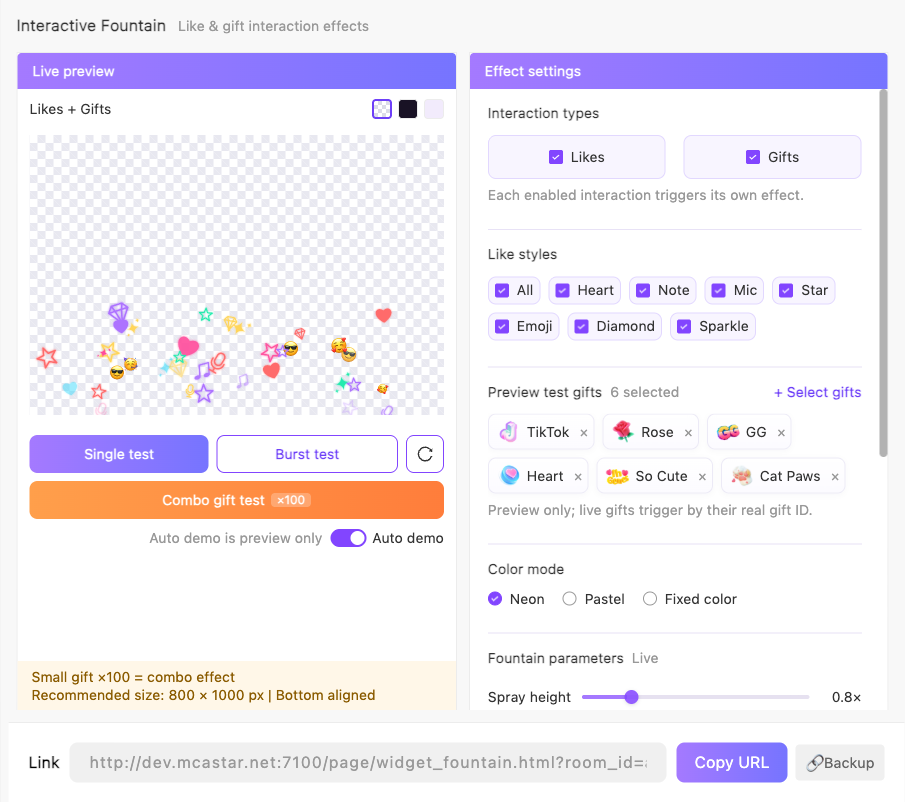
Setting Details#
Interaction Types and Like Styles#
| Setting | What it does | When to change it | Notes |
|---|---|---|---|
Likes / Gifts |
Chooses which interactions trigger the fountain | Turn the other one off when you only want a single interaction type | Both are enabled by default; they can be enabled together |
Like styles |
Chooses which shapes the like particles use: Heart Note Mic Star Emoji Diamond Sparkle |
Adjust it when you want to match your live room's style | All shapes can be selected; this area has no effect when Likes is turned off |
Preview test gifts |
Chooses the gift icons used for preview and testing | Add gifts when you want to see a specific gift's burst in the config page | Up to 500 gifts; preview and testing only — in a real live stream, any gift triggers the effect |
Color Mode#
| Setting | What it does | When to change it | Notes |
|---|---|---|---|
Neon / Pastel / Fixed color |
Chooses the color scheme of the like particles | Pick Fixed color when you want a consistent palette for the room |
Each viewer keeps a stable color, making them easier to recognize |
Palette and Custom under fixed color |
Specifies an exact color | - | Six preset colors + a custom color picker |
Fountain Parameters#
These parameters are marked Live; the preview and the widget update immediately after a change:
| Setting | What it does | Range / Default |
|---|---|---|
Spray height |
How high particles are tossed | 0.5-2.0×, default 0.8× |
Combo spray height |
Separately controls the height of the central big gift in combo effects | 0.5-2.0×, default 1.0× |
Count multiplier |
Overall multiplier applied to the number of spawned particles | 1-5×, default 2× |
Icon size |
Size of particles and gift icons | 0.3-3.0×, default 1.5× |
Spread |
How wide particles scatter horizontally | 0-100%, default 60% |
Duration |
Time from spawn to fade-out for particles | 1-7 seconds, default 2.5 seconds |
Launch position |
Where bursts launch from: Random / Center / Sides |
Default Random |
Restore defaults |
Resets all settings to their defaults and saves | - |
Preview and Testing#
The Live preview on the left comes with a set of test tools, so you can verify the effect as many times as you want before going live:
| Action | What it does |
|---|---|
Single test |
Simulates one occurrence of each enabled interaction |
Burst test |
Simulates a high-density burst scenario |
Combo gift test |
Plays one combo effect directly (×100) |
Clear animations |
Clears the current frame of both the preview and the widget |
Auto demo |
Loops bursts automatically when there is no interaction; preview only — it never appears in the real widget |
Background Transparent / Dark / Light purple |
For preview observation only; the real widget is always transparent |
Tests are also broadcast to the widget
The effects of the test buttons are also broadcast to loaded OBS widgets — during a real stream, verify with real interactions, or run Clear animations first.
Using it in your streaming tool
You need to copy the widget link for Interactive Fountain and load it into your streaming tool.
The widget is a transparent full-frame overlay. It is recommended to use an 800 × 1000 px size in your streaming tool with bottom alignment, so the fountain bursts from the bottom of the frame.